
Your own hold time
Anywhere from 200 to 2200 ms, a second by default. A practice pad in the settings shows a filling bar while you press and tells you how long your last press actually was.
Windows’ ClickLock, for macOS
Select three pages of text, or drag a file across two screens, without holding the mouse button the whole way. One more click lets go. Works with a mouse and with the trackpad.
Press and hold the mouse button anywhere in this panel. A ring fills around the pointer. Keep holding until it closes, then let go — the button stays down as far as this page is concerned. Move the pointer with nothing held and the text selects itself, the way every app on your Mac behaves once ClickLatch has the button. One more click and it lets go again.
Hold the button here
Ready.
A recreation of the real thing, in the browser. With a keyboard: focus the panel and hold Space.
A menu bar icon and nothing else. No Dock icon, no window sitting in front of your work.
On quit, on switch-off, on a withdrawn permission — a final mouse-up always goes out.
The only request it ever makes is to GitHub, to ask whether there is a newer version.
GPL-3, every line on GitHub — down to the code that draws the app’s own icon.
Features
Anywhere from 200 to 2200 ms, a second by default. A practice pad in the settings shows a filling bar while you press and tells you how long your last press actually was.
It fills as you hold and closes into a full ring the moment the button locks. Colour, thickness, size, delay and fade are all yours — or turn it off and lock invisibly.
Tink on locking, Pop on release, picked from the sounds macOS already ships, each with its own volume and a preview button.
The same gesture on both, because the app works on the events rather than the hardware. The right button can lock too, if you ask for it.
Don’t lock when the mouse moves while holding. Let Escape release. Let go by itself after a few seconds. All off by default — with them off, the behaviour is exactly Windows’.
Checks GitHub for a new release once a day, installs it on request, and refuses any build that isn’t signed with the same key as the copy you are running.
Mechanism
A CGEventTap at session level rewrites three things on
their way past. Nothing is simulated, and no app needs to know.
Held past the threshold, the mouseUp is swallowed. As far as macOS is
concerned the button is still down.
Each mouseMoved is rewritten into a mouseDragged, so every app
sees an ordinary drag — selecting, dragging, resizing.
That mouseDown becomes the mouseUp that was held back. The
drag ends exactly where you clicked.
The tap runs on a dedicated thread with its own run loop, so a busy main thread can never make it time out. If macOS switches it off anyway, the app switches it straight back on. The ring is a separate click-through window driven by a display link, so drawing it cannot slow the tap down.
Quit the app, switch it off, or take the permission away, and it sends a final
mouseUp on the way out. A mouse button can never be left hanging.
Screenshots
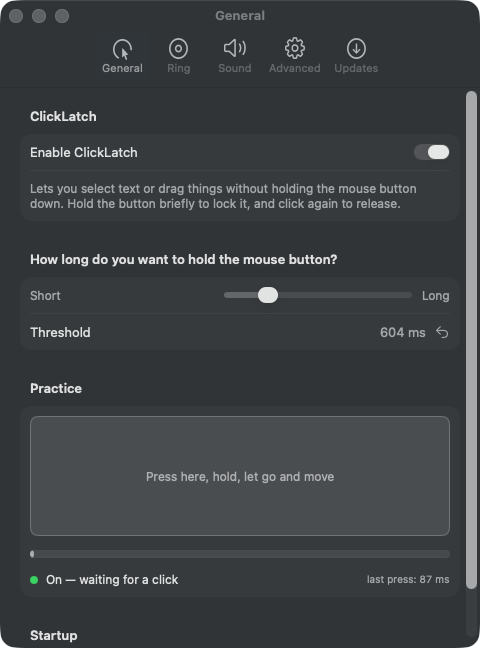
The hold duration, with a practice pad that reports your last press in milliseconds.
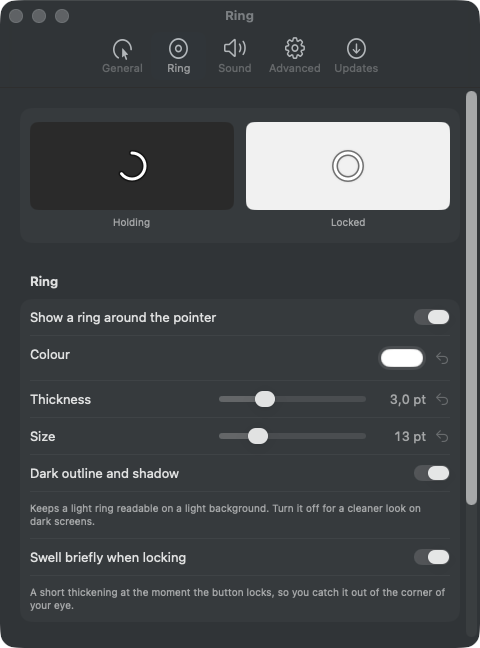
A live preview at the top shows every change straight away: mid-press on a dark background, locked on a light one.
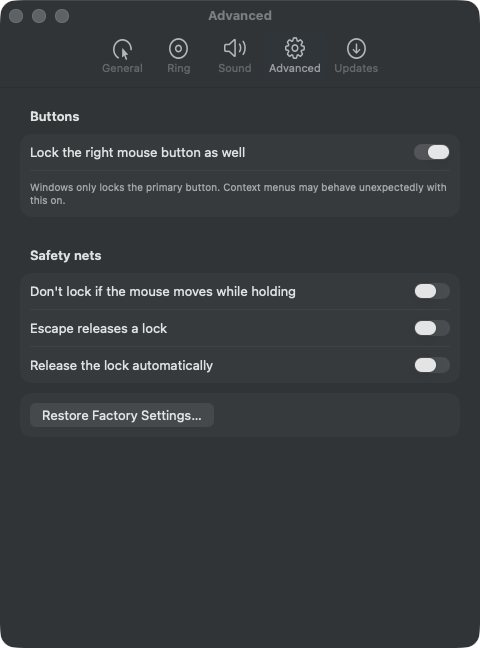
The safety nets, all off by default, and one button that puts everything back.
Every setting that holds a value has a small ⟲ beside it that puts that one setting back to its factory value.
Getting started
Unzip it and drag ClickLatch.app into your Applications folder.
You need Xcode or the Xcode command line tools. Building it yourself also gets you a build for your own Mac, Intel included.
git clone https://github.com/joelvalentijn/clicklatch.git
cd clicklatch
./Scripts/create-signing-certificate.sh
./Scripts/bundle.sh --install --runThe first script makes a self-signed code signing certificate, once. Skip it and everything still builds, but the signature is then ad hoc — its identity is the hash of that one build, so macOS drops the Accessibility permission on every rebuild and the app cannot update itself. With the certificate, both problems go away.
ClickLatch has to alter mouse events, and macOS only allows that with the Accessibility permission. Pick Grant Accessibility permission… from the menu bar icon, or switch ClickLatch on yourself under System Settings → Privacy & Security → Accessibility. Then turn on Enable ClickLatch in the same menu.
macOS ties that permission to the app’s code signature. A downloaded build keeps the same signature across updates, so the permission sticks.
FAQ
It has a Drag Lock of its own, on the trackpad, for people who drag by tapping. It does nothing for a mouse, a trackball or a joystick mouse, and its hold time cannot be changed. ClickLatch vs. macOS Drag Lock covers what the built-in one does, when it is enough, and what to use when it is not.
Apps that read the button state directly, with
NSEvent.pressedMouseButtons, instead of following drag events, do not notice
the lock. No event tap sees anything inside secure input contexts either — password
fields and the login window. And Mission Control, switching Spaces or a trip to the menu
bar can drop an active lock.
Builds up to 0.1.0 were signed with a self-signed certificate; from 0.1.1 they carry an Apple Developer ID. The updater only accepts a build signed with the same key as the copy you are running, so this one crossing has to be done by hand: download it above and drag it over the old app. macOS will ask for the Accessibility permission again, because that permission is tied to the signature. Updates after this one install themselves as usual.
Only a request to GitHub’s releases API, once a day, to ask what the latest version is — and only while update checking is switched on. Nothing about you, your clicks or your keyboard goes anywhere. If you turn on Escape releases a lock, key presses are routed past the app; it examines nothing but Escape, passes everything else through untouched, and stores none of it.
The download is built for Apple silicon. On an Intel Mac, build it from source with the steps above — the code itself has nothing architecture-specific about it.
Yes. Press and hold on the trackpad the same way you would a mouse button. The app works on the events macOS produces, so it does not care what produced them.
Quit it from the menu bar icon and drag ClickLatch.app to the Trash. To tidy
up completely, remove it from System Settings → Privacy & Security → Accessibility with
the – button.
Long selections and long drags stop being something you brace for.
Feedback
Something broken, an idea, or a question. It reaches me either way.